
 By
Chethan Rao
Published 59 minutes ago
By
Chethan Rao
Published 59 minutes ago
Chethan is a reporter at Android Police, focusing on the weekend news coverage for the site. He has covered tech for over a decade with multiple publications, including the likes of Times Internet, Guiding Tech, and Android Headlines, to name a few. Chethan's love for Android dates back to the days of the Samsung/Google Nexus S, with his first Android phone being the HTC Desire HD back in 2010. Away from work, he's on the lookout for live cricket streams or NBA highlights. He also enjoys the occasional hour or two of console/mobile gaming whenever time permits.
Sign in to your Android Police account Summary Generate a summary of this story follow Follow followed Followed Like Like Thread Log in Here is a fact-based summary of the story contents: Try something different: Show me the facts Explain it like I’m 5 Give me a lighthearted recapThere's no dearth of image editing tools you can find in the Google Photos app. However, unlike some alternative image editing apps, the Photos app cannot edit specific parts of people's faces. But that's about to change imminently.
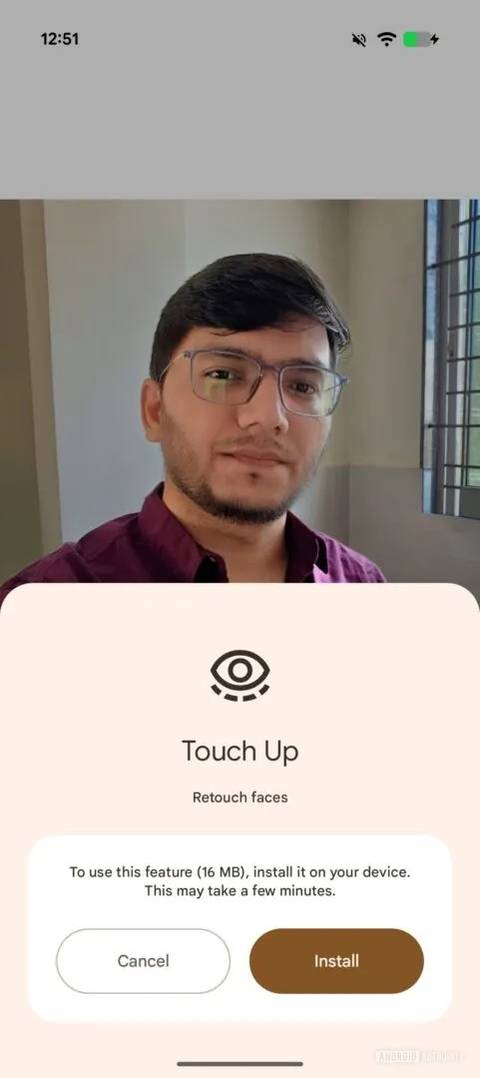
Looking within version 7.56.0.839465534 of the Google Photos app, Android Authority has managed to activate the dormant "Touch Up" functionality. The site first uncovered the underlying code for the feature back in October and has now enabled it to give us an early preview of how it works.
 Credit: Android Authority
 Credit: Android AuthorityClose
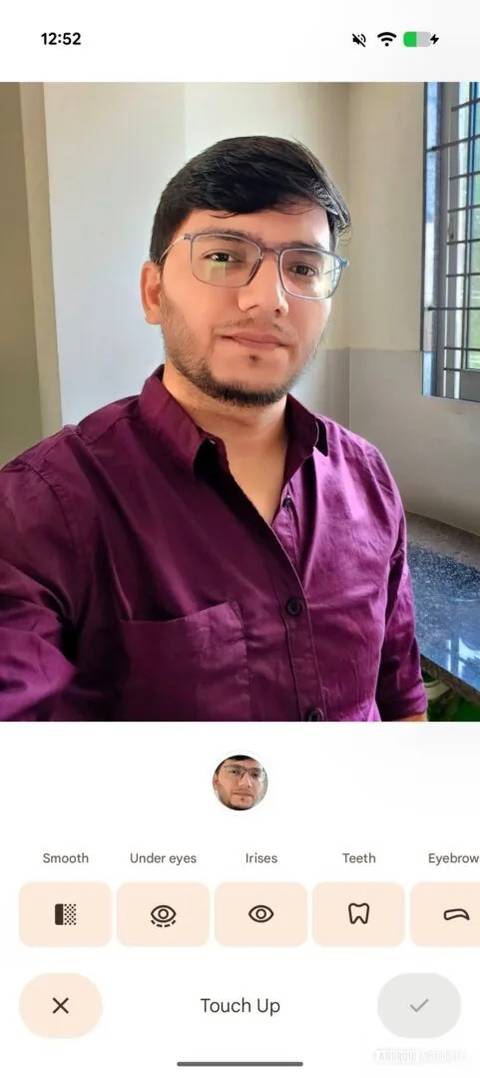
This feature will appear under Actions, which is accessible from the row of editing options at the bottom of the image editor. Users will be prompted to download the 16MB Touch Up package to get started, which, as the description plainly states, can "Retouch faces." Following this brief process, users will find a brand-new interface containing these tools:
- Smooth
- Under Eyes
- Irises
- Teeth
- Eyebrows
- Lips
Each of these options offers a slider ranging from 0 to 100 to adjust the effects as required. But this isn't even the feature's best attribute.
Seamlessly edit faces in group photos
In addition to giving you granular control over facial characteristics in selfies, Touch Up can also edit the faces in group photos. Up to six faces can be edited in this fashion, as shown in the screenshot below, with the ability to individually edit each face using the new tools. If a group photo contains more than six faces, a toast will notify users that only six are supported.
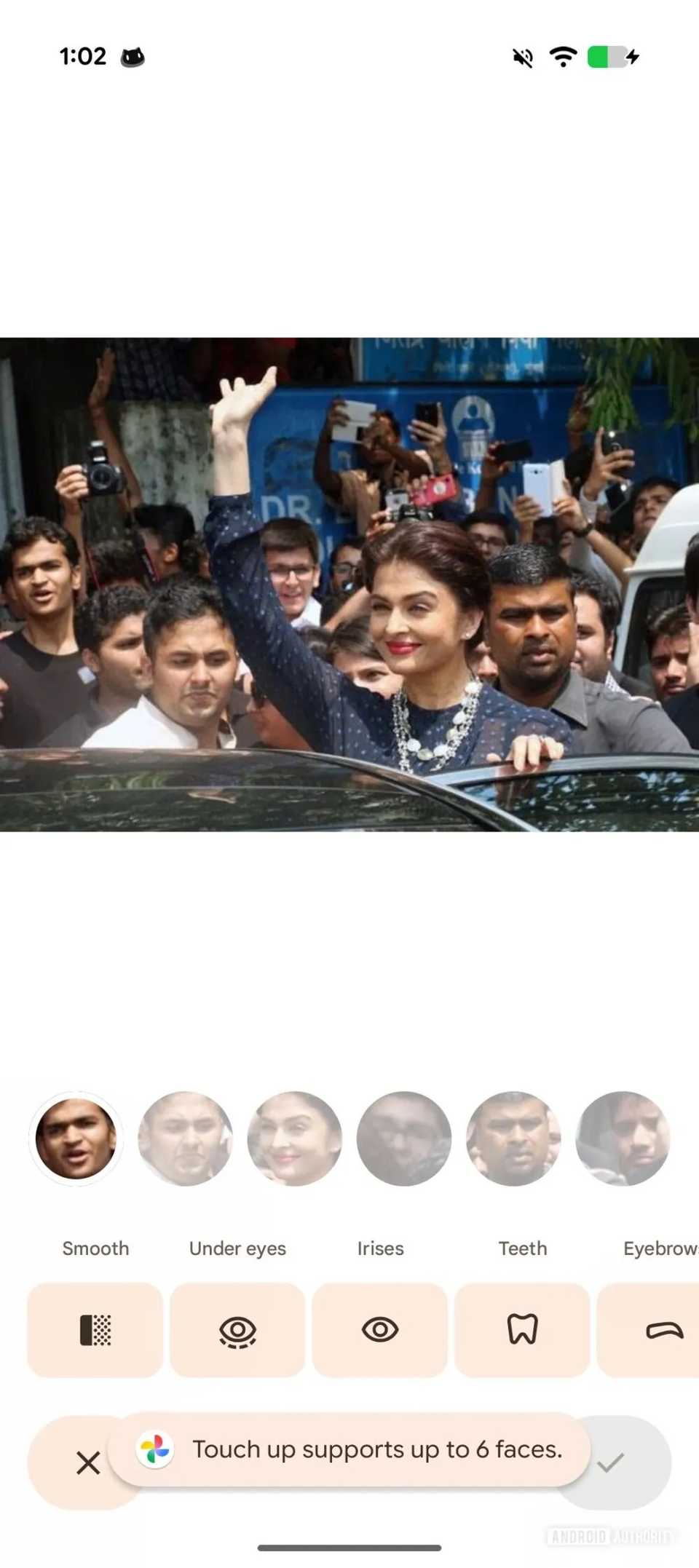 Credit: Android AuthorityClose
Touch Up won't let users manually select the faces they want to edit in an image, which may be a hindrance if the picture has several people in the background. A paid Gemini subscription will likely be required to tap into this feature in Google Photos, though this cannot be confirmed at the moment.
As with leaks of this nature, we don't yet have a date to mark on our calendars for its rollout in Google Photos. But since Touch Up appears to be functioning as expected, at least based on Android Authority's early assessment, we'd be surprised if Google Photos didn't make this official over the next few weeks.
It's worth remembering that Google's Camera app already offers Subtle and Smooth face retouching options for Portrait images. This upcoming Touch Up feature will take that a step further by offering advanced editing options directly within the Photos app.
What do you make of this upcoming editing feature in Google Photos?
-
 Applications
We want to hear from you! Share your opinions in the thread below and remember to keep it respectful.
Be the first to post Images Attachment(s) Please respect our community guidelines. No links, inappropriate language, or spam.Your comment has not been saved
Send confirmation emailThis thread is open for discussion.
Be the first to post your thoughts.
- Terms
- Privacy
- Feedback
 5 days ago
Google Keep begins the long-awaited migration of reminders to Tasks
 Nov 27, 2025
One UI is about to solve a dark mode issue everyone forgot existed
 Nov 26, 2025
Google is bringing Circle to Search to the Gemini overlay
 Nov 25, 2025
Follow up questions on Circle to Search now default to AI Mode
Trending Now Samsung’s entire One UI 8.5 feature list leaks ahead of beta
 4 quiet Calendar upgrades that changed how I manage my time
 This is the only Google TV streaming box you should be looking to buy in 2025